For Developers · Dashboard
General Settings
General Settings is the Hub Details tab — the foundational config for your service. Service name, identifier, key prefix, key format, the API key for our public API, and the on/off switches for permanent links and key extension. Most of these settings only need to be set once, but the Identifier in particular is critical and worth getting right the first time.
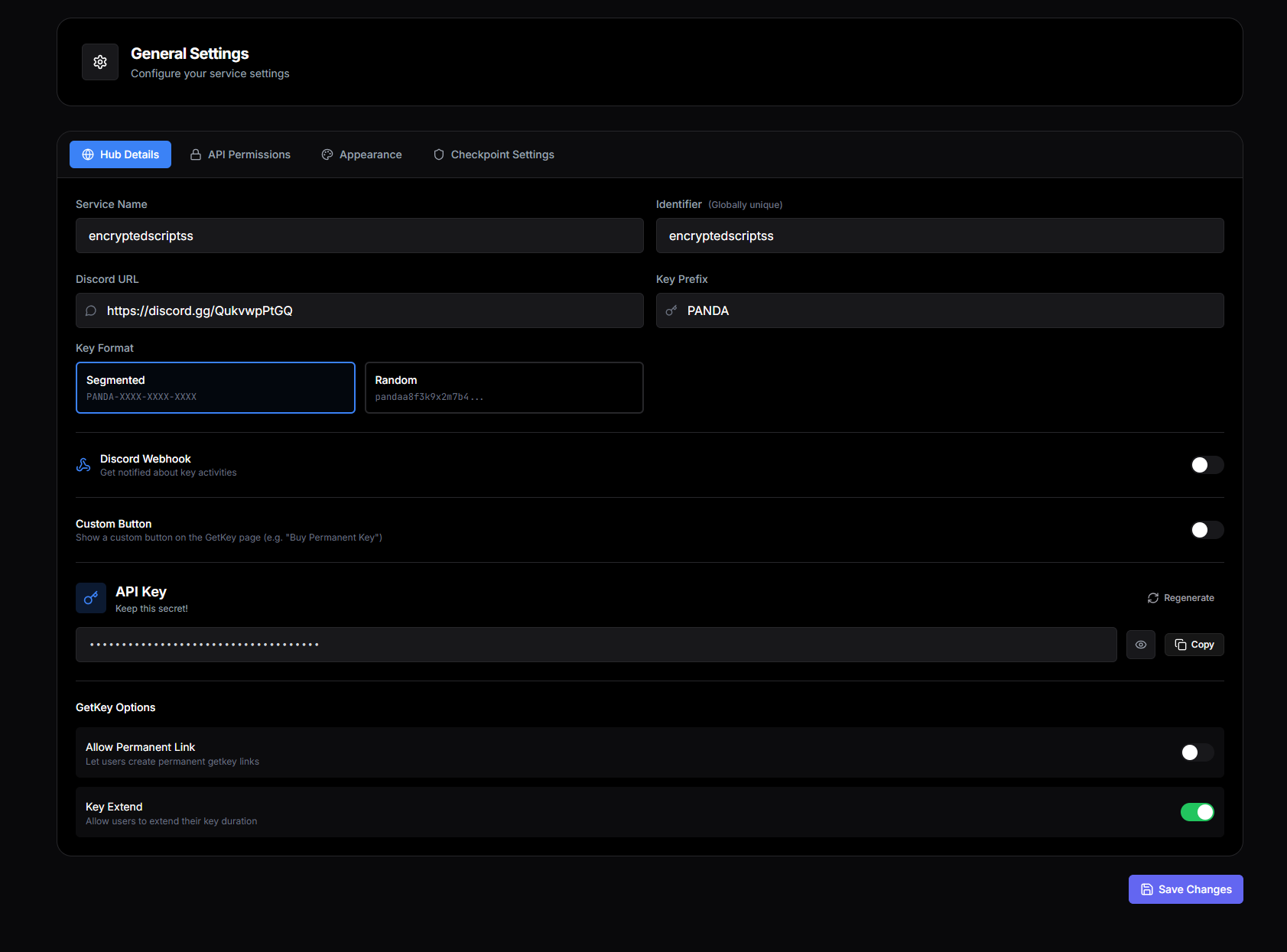
Service Name
The display name for your service. It shows up as the header on your get-key page and in any branded surfaces (webhooks, Discord messages, key emails). Pick the public-facing name you want users to associate with your service — it can be changed later if you rebrand, but consistency is worth more than perfection here.
Best practice
Identifier
The single most important field on this page. The Identifier is your service's slug — it identifies your service everywhere: the get-key URL, HWID reset endpoints, key validation, library integrations, our public API, webhook payloads. Treat it like a username — short, lowercase-friendly, and stable.
Example: if your Identifier is encryptedscriptss, your get-key URL becomes https://ads.pandauth.com/getkey/encryptedscriptss.
Set it carefully
Discord URL
Optional. The invite link to your Discord server. When set, it appears on your get-key page as a "Join Discord" link and on the key page so users can reach you for support. Leave blank if you do not have a Discord server or do not want to expose it.
Key Prefix
The string prepended to every generated key. For example, a Key Prefix of PANDA produces keys like PANDA_a8sdnwj... long-random-tail.
The prefix is purely cosmetic — it does not affect validation or security. Use it for branding, for distinguishing keys from different services in your support tickets, or just to make keys look distinctly yours.
Key Format
How the random portion of the key is laid out. Two options:
- Randomized — a single long random string. Example:
PANDA_a8sdnwjjdlasdjlkajsdkaljsdklgokilj. More compact but harder to read or type by hand. - Segmented — random tokens split by dashes. Example:
PANDA_a8sd-nwjj-dlas-djlk-ajsd-kalj-sdkl. Easier to read and type, looks more like a traditional license key. The dashes add no security, just readability.
Pick what your users will see most
Custom Button
Optional. A button that appears on your get-key page below the "Continue" button. The most common use is selling permanent keys — set the button label to "Buy Permanent Key" with a link to your purchase page, and users see both the free flow and the paid option side by side.
The button has two fields:
- Button Label — the visible text on the button. Keep it under 30 characters so it fits on mobile.
- Button URL — where it links. External payment pages, Discord boost links, your own website — any URL works.
Leave both fields blank to hide the button entirely.
API Key
Your service's API Key for Panda Auth's public API. Use it when you build something that needs to talk to your service from outside the get-key flow — a custom Discord bot that validates keys, a license-management dashboard you build yourself, an analytics tool that pulls completion data.
Security rules
- Never share this key publicly. Not on GitHub, not in client-side code that ships to users, not in screenshots, not in support tickets.
- If it leaks, regenerate immediately. The dashboard has a regenerate option that invalidates the old key the moment a new one is created.
- Use it server-side only. Anything that runs in a user's browser or in a Lua script they load can read what is in front of it — the API Key does not belong there.
Allow Permanent Link
When this is on, users can reach your get-key page without their HWID being baked into the URL. The link becomes simpler — for example, https://ads.pandauth.com/getkey/encryptedscriptss without the ?hwid=... parameter. The tradeoff is that your service depends on the get-key page collecting the HWID itself rather than receiving it from the referring script.
- Turn it on if: You want a clean, shareable get-key URL — for Discord embeds, link bios, marketing materials.
- Turn it off if: Your script or executor always provides the HWID in the URL and you want to enforce that contract.
Allow Key Extend
When on, users with an existing key can extend their key's expiration by completing extra checkpoints. For example, a user with a 6-hour key can run through one more checkpoint to add another 6 hours to it — no need to wait until expiration and start from scratch.
Two related fields control the extension behavior:
- Addon Checkpoints — how many extra checkpoints the user must complete to earn the extension. 1 is a common starting value.
- Addon Time — how many extra hours the extension adds. Common values mirror your duration tiers (6, 12, 24).
Why this matters
Recommended defaults
- Service Name: Your public brand name
- Identifier: Short, lowercase, stable
- Discord URL: Your server invite (or blank)
- Key Prefix: Your brand or a short identifier
- Key Format: Segmented (more user-friendly)
- Custom Button: Blank until you have a paid offer
- Allow Permanent Link: On (cleaner URLs for marketing)
- Allow Key Extend: On with addon checkpoints = 1 and addon time matching your shortest tier