For Developers · Kryptic Vault
Upload & Obfuscation
Upload your Lua script to Kryptic Vault, configure the validation library and obfuscation settings, and the vault produces a single loadstring you can ship to users. The upload form covers everything — script name, service binding, library version, obfuscation preset, and the extra Kryptic options that harden the loader.
Open the Upload form
From the Kryptic Vault dashboard, click Upload in the top-right. The upload form opens and looks like this:
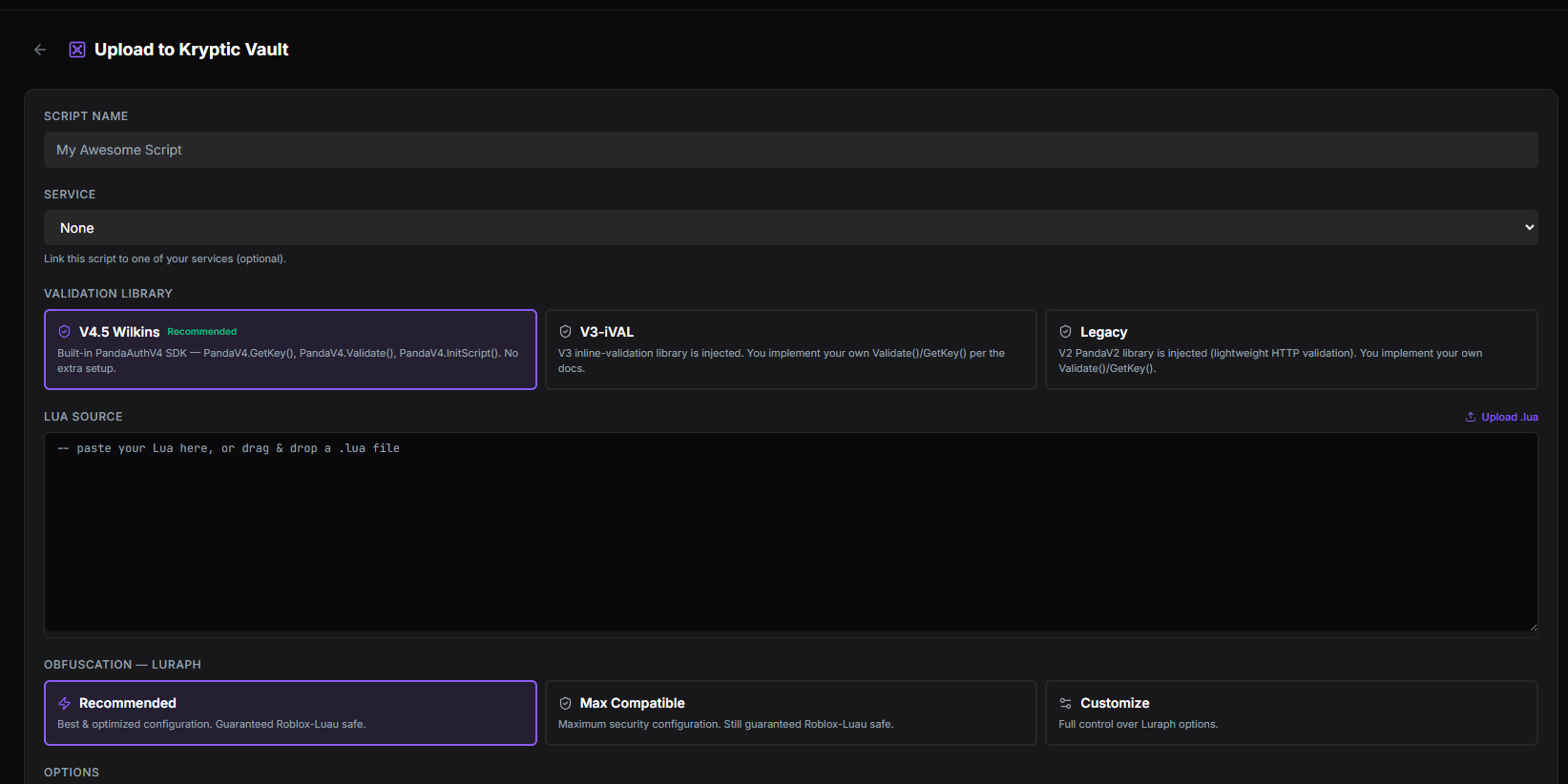
Script Name
The display name for your script. Pick anything you want — this shows up in the vault dashboard and in your service's script list. Pure organizational naming; users never see it.
Service
The service this script is tied to. Pick from the dropdown of your services (for example, "Panda Developer Kit"). The script is linked to that service for key validation, telemetry, and permissions — make sure you pick the right one.
Trust List
What it does: Gates who is allowed to run this specific script, by device (HWID). It does not keep its own list — it reads the HWID Whitelist and Blacklist of the service you picked above, the same table you manage under Service → Security → Trust List. One blacklist entry therefore covers your get-key page and every Vault script at once.
Two modes:
- Blacklist Only (default) — everyone runs the script except devices you have blacklisted.
- Whitelist Only — only devices on the whitelist run the script. Everyone else is turned away. The blacklist still wins, so a device on both lists is blocked.
When it runs: the loader checks the list at the last moment before it hands over your script, once the executor has reported its HWID. A blocked device never receives a single byte of the script — it is kicked with "You're Blacklisted from the Service (Your Service)" (or "You're not Whitelisted for the Service (Your Service)" in Whitelist Only mode). Because the check is live, blacklisting someone in the dashboard takes effect on their very next execution.
Needs a linked service
Blocked executions show up in Telemetry
Validate Libraries
Picks the validation library version the script will use to call back to Panda Auth at runtime. The main options:
- PandaAuthV4 (Built-in) — recommended for new scripts. Ships inside the loader with your Service ID already baked in, so you never call configure().
- V3-iVAL (Pelinda) — HTTP AES/SHA inline validation, injected ahead of your source. Use it when you want the V3 call shape.
- I add the library myself — nothing is injected or pre-configured. You integrate a Panda Auth validation library in your own script.
Pick PandaAuthV4 for new uploads
Lua Source
Upload your actual script file. This is usually your key system GUI script or the main entrypoint — the SDK from the validation library you picked above loads here.
Obfuscation (Luraph)
The obfuscation preset that runs against your script before it's served. Three presets:
- Recommended — balanced Luraph configuration for most scripts. Strong protection, broad compatibility.
- Max Compatible — obfuscation tuned for low-UNC executors. Less aggressive, but works on more devices.
- Customization — manually configure every Luraph option.
Don't touch Customization unless you know Luraph
Kryptic Vault options
Extra hardening features that run alongside obfuscation. Each is independent — turn on the ones you want.

- Heartbeat — periodic check-ins from the running script to verify it's still legitimate. Fails closed if the heartbeat stops, catching dump-and-replay attacks.
- Performance — runtime optimizations for the loader.
- AI Optimization — applies a machine-learning tuned obfuscation profile based on similar scripts.
- Silent Mode — failure modes don't produce visible errors. Bypass tools have a harder time iterating without clear error messages to debug against.
- Auto-Backup to Google Drive — every time you change your script, an automatic backup is pushed to your connected Google Drive.
Ini Script (2nd Script)
An advanced feature: upload a second script that runs only when the first script triggers it via PandaV4.InitScript(). The pattern lets you split a loader from the actual UI or game code, so the second script stays hidden until the first script explicitly invokes it. Useful for keeping your main script logic out of the initial loadstring path — bypass tools that capture the first loadstring don't get the actual logic, just the bootstrap.
Obfuscator backends
Beyond Luraph, Kryptic supports community-built obfuscators for users who want alternatives:
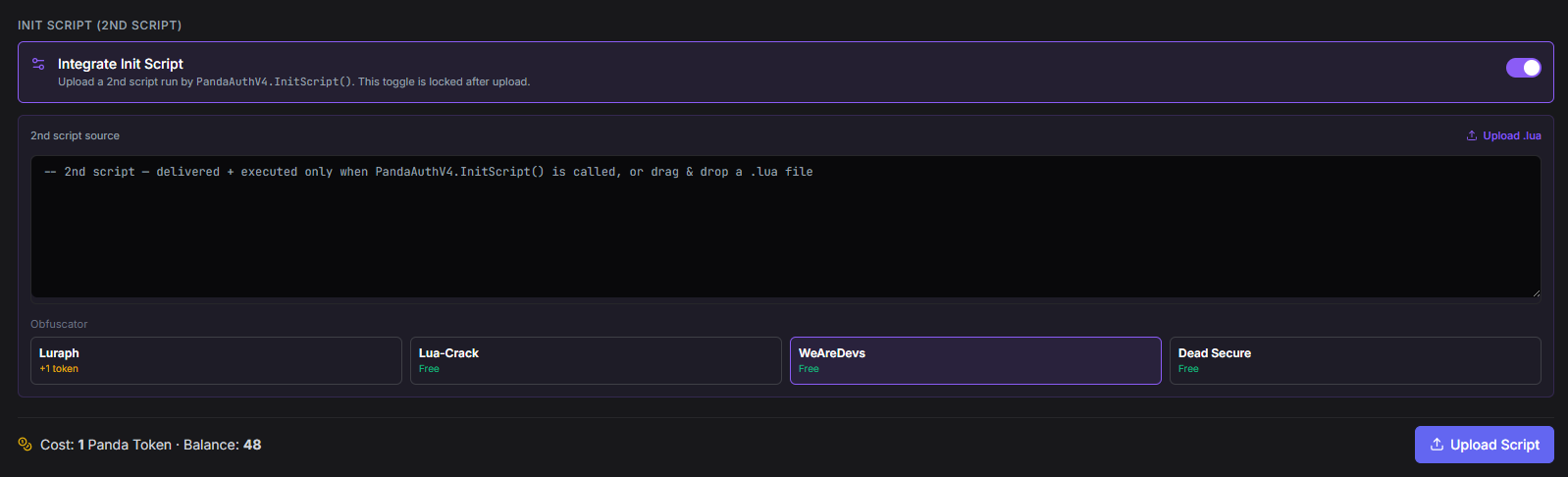
- Luraph — the recommended commercial obfuscator. Strong, well-supported, broadly compatible.
- Lua-Crack — community-built obfuscator with a different attack surface than Luraph.
- WeAreDevs / Prometheus — open-source obfuscator stack.
- Dead-Secure — community-built obfuscator focused on aggressive protection.
Pick one, stick with it
Upload
Click Upload. Kryptic obfuscates the script, builds the loader, generates a loadstring URL, and adds the script to your vault dashboard. You can now ship the loadstring to your users.
Done — you have a loadstring